- dnf updateが失敗する原因(2026.09.17)
-
RedHawk上で、dnf updateが失敗する原因は、 ccur-kernel-sourceの依存関係にopenssl-develが含まれていて、バージョン指定がされていないことが原因です。
このため、ユーザランドを更新することが出来ない不具合が発生しています。
一旦、 ccur-kernel-sourceを削除して、再度インストールすることで、この不具合を回避出来ます。
下記の手順で、dnf updateを行ってください。
  #  rpm -e ccur-kernel-source-9.2.11-20260602.x86_64
  #  dnf update
  #  dnf install ccur-kernel-source-9.2.11-20260602
- pam_capabirityが動作しない原因(2026.08.26)
systemdとXサーバーのセキュリティ変更に起因して、最近のどのLinuxディストリビューションに含まれるグラフィカルloginにおいても、ケーパビリティは自動的に許可されません。
ユーザーはケーパビリティを利用するために、再度同じユーザーになるための su を利用します。
この時、sudoを組み合わせることで、パスワード入力を回避できます。
回避策
(1) root で /etc/sudoers ファイルを開きます。
# visudo
/etc/sudoers ファイルは、sudo コマンドで適用されるポリシーを定義します。
/etc/sudoers ファイルで、wheel 管理グループのユーザーに sudo アクセスを付与する行を見つけます。
## Allows people in group wheel to run all commands
%wheel ALL=(ALL) ALL
110行のコメントを外します。
109 ## Same thing without a password
110 %wheel ALL=(ALL) NOPASSWD: ALL
変更を保存し、エディターを終了します。
sudo アクセスを付与するユーザーを、wheel 管理グループに追加します。
# usermod --append -G wheel ユーザ名
(2) RedHawkユーザガイド
に従ってケーパビリティを定義します。
/etc/security/capability.confの59行目のコメントを外します。
54: ###########################################################################
55: # GROUPS
56: ###########################################################################
57:
58: # the 'wheel' group
59: group	wheel		admin
(3) ケーパビリティ定義ファイルに変更を加えます。
# keyf1=system-auth
# keyf2=password-auth
# cd /etc/pam.d
# cp ${keyf1} ${keyf1}-local
# cp ${keyf2} ${keyf2}-local
# echo "session required pam_capability.so" >> ${keyf1}-local
# echo "session required pam_capability.so" >> ${keyf2}-local
# ln -sf ${keyf1}-local ${keyf1}
# ln -sf ${keyf2}-local ${keyf2}
(4) 再起動してください。
(5) 確認方法
$ uname -r
6.1.157-rt57-RedHawk-9.2.10
$ id
uid=2002(redhawk) gid=2000(wheel) groups=2000(wheel) context=unconfined_u:unconfined_r:unconfined_t:s0-s0:c0.c1023
$ shield -r -a 1 -c
write(/proc/shield/irqs) returned 1 (Operation not permitted)
$ sudo -u redhawk shield -r -a 1 -c

     CPUID      irqs     ltmrs     procs
--------------------------------------------------
         0        no        no        no
         1       yes       yes       yes
         2        no        no        no
         3        no        no        no
         4        no        no        no
         5        no        no        no
         6        no        no        no
         7        no        no        no
         8        no        no        no
         9        no        no        no
        10        no        no        no
        11        no        no        no
        12        no        no        no
        13        no        no        no
        14        no        no        no
        15        no        no        no
- Nvidiaプロプライエタリードライバ上のWaylandについて(2025.08.22)
RedHawk9.2 カーネルの Nvidiaプロプライエタリードライバー(570.x/580.x) でWaylandセッションが動作しません。
RL9.6_update and NVIDIA nvidia-570.172.08 no wayland
GDM用のWaylandサポートを無効にするudevルール(/usr/lib/udev/rules.d/61-gdm.rules)があることが原因です。
Rocky 9.x 上で Wayland を動作させるためには、以下の要件があります。
NVIDIA ドライバー 570 以降をインストールしてください。( 最新のドライバーを推奨します。)
# rm /usr/lib/udev/rules.d/61-gdm.rules
# blscfg --kopt-add=nvidia-drm.modeset=1
# dracut -fv --omit-drivers="nvidia_drm nvidia_modeset nvidia"
その後、再起動すると Wayland サーバーが GDM オプションとして表示されます。
nvidia-drm.modset=1 を指定しないと、解像度がデフォルトのフレームバッファ値に固定されることに注意してください。
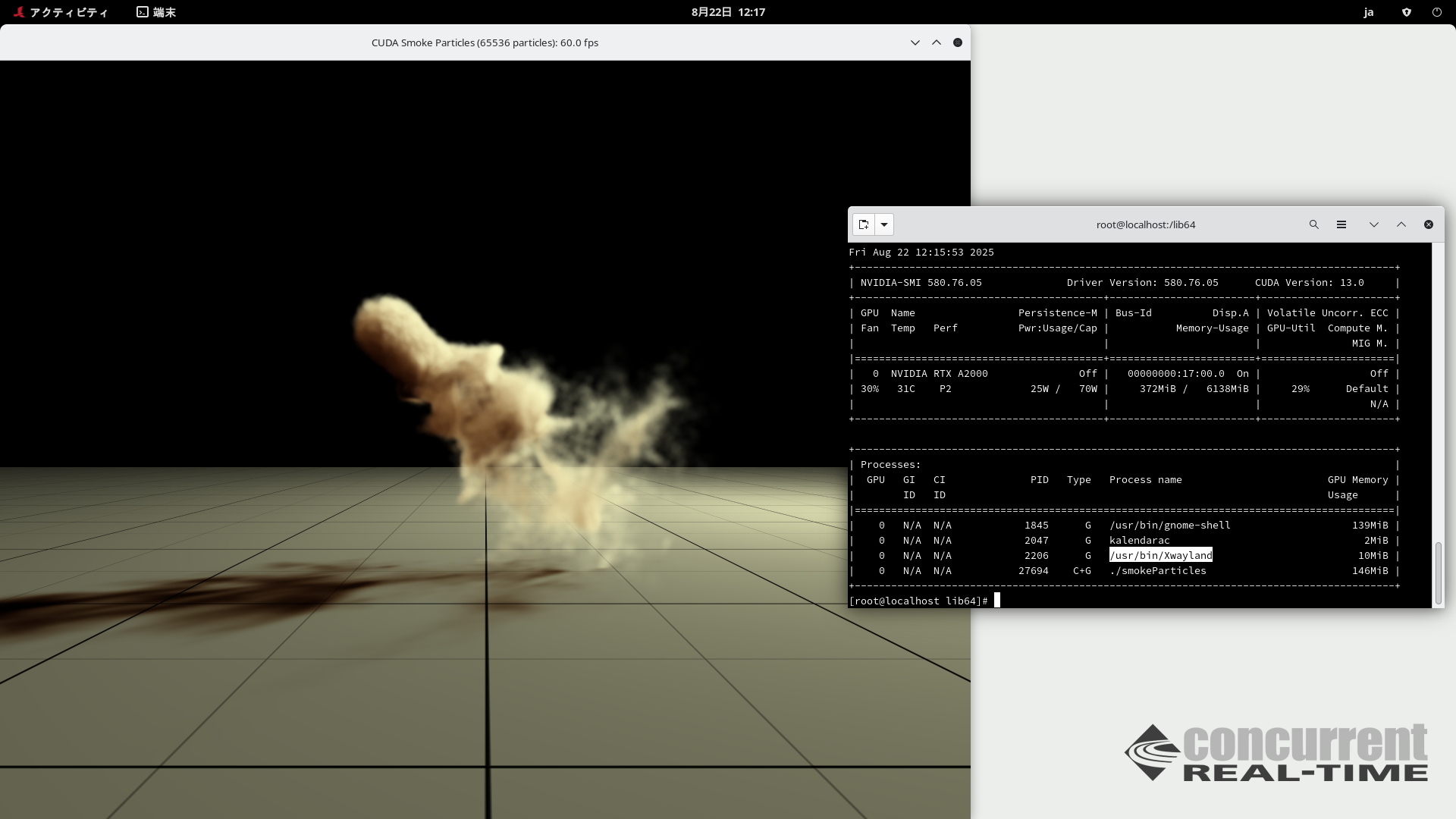
また、CUDA12.4/13 アプリケーションが Wayland サーバー上でローカルに実行できることも確認しました。
(下図に示されるように smakeParticles は Xwayland上で動作しています。)
注意:
1. GLを含むcuda13サンプルプログラムをコンパイルするためには、 dnf install mesa-libGL-devel freeglut-develr cmakeの実行が必要です。
2. Rocky 10にインストールされている新しいGDMバージョンでは、利用可能なGDMがWaylandのみであるため、61-gdm.rulesは同梱されていません。
3. NVIDIAは Rocky8/9でxorg-x11-server-xorgパッケージの削除を推奨しています。
 Back
-
systemdとXサーバーのセキュリティ変更に起因して、最近のどのLinuxディストリビューションに含まれるグラフィカルloginにおいても、ケーパビリティは自動的に許可されません。
ユーザーはケーパビリティを利用するために、再度同じユーザーになるための su を利用します。
この時、sudoを組み合わせることで、パスワード入力を回避できます。
回避策
(1) root で /etc/sudoers ファイルを開きます。
# visudo
/etc/sudoers ファイルは、sudo コマンドで適用されるポリシーを定義します。
/etc/sudoers ファイルで、wheel 管理グループのユーザーに sudo アクセスを付与する行を見つけます。
## Allows people in group wheel to run all commands
%wheel ALL=(ALL) ALL
110行のコメントを外します。
109 ## Same thing without a password
110 %wheel ALL=(ALL) NOPASSWD: ALL
変更を保存し、エディターを終了します。
sudo アクセスを付与するユーザーを、wheel 管理グループに追加します。
# usermod --append -G wheel ユーザ名
(2) RedHawkユーザガイド に従ってケーパビリティを定義します。
/etc/security/capability.confの59行目のコメントを外します。
(5) 確認方法
# visudo
/etc/sudoers ファイルは、sudo コマンドで適用されるポリシーを定義します。
/etc/sudoers ファイルで、wheel 管理グループのユーザーに sudo アクセスを付与する行を見つけます。
## Allows people in group wheel to run all commands
%wheel ALL=(ALL) ALL
110行のコメントを外します。
109 ## Same thing without a password
110 %wheel ALL=(ALL) NOPASSWD: ALL
変更を保存し、エディターを終了します。
sudo アクセスを付与するユーザーを、wheel 管理グループに追加します。
# usermod --append -G wheel ユーザ名
(2) RedHawkユーザガイド に従ってケーパビリティを定義します。
/etc/security/capability.confの59行目のコメントを外します。
54: ###########################################################################
55: # GROUPS
56: ###########################################################################
57:
58: # the 'wheel' group
59: group wheel admin
(3) ケーパビリティ定義ファイルに変更を加えます。
# keyf1=system-auth
# keyf2=password-auth
# cd /etc/pam.d
# cp ${keyf1} ${keyf1}-local
# cp ${keyf2} ${keyf2}-local
# echo "session required pam_capability.so" >> ${keyf1}-local
# echo "session required pam_capability.so" >> ${keyf2}-local
# ln -sf ${keyf1}-local ${keyf1}
# ln -sf ${keyf2}-local ${keyf2}
(4) 再起動してください。(5) 確認方法
$ uname -r
6.1.157-rt57-RedHawk-9.2.10
$ id
uid=2002(redhawk) gid=2000(wheel) groups=2000(wheel) context=unconfined_u:unconfined_r:unconfined_t:s0-s0:c0.c1023
$ shield -r -a 1 -c
write(/proc/shield/irqs) returned 1 (Operation not permitted)
$ sudo -u redhawk shield -r -a 1 -c
CPUID irqs ltmrs procs
--------------------------------------------------
0 no no no
1 yes yes yes
2 no no no
3 no no no
4 no no no
5 no no no
6 no no no
7 no no no
8 no no no
9 no no no
10 no no no
11 no no no
12 no no no
13 no no no
14 no no no
15 no no no
- Nvidiaプロプライエタリードライバ上のWaylandについて(2025.08.22)
-
RedHawk9.2 カーネルの Nvidiaプロプライエタリードライバー(570.x/580.x) でWaylandセッションが動作しません。
RL9.6_update and NVIDIA nvidia-570.172.08 no wayland
GDM用のWaylandサポートを無効にするudevルール(/usr/lib/udev/rules.d/61-gdm.rules)があることが原因です。
Rocky 9.x 上で Wayland を動作させるためには、以下の要件があります。
NVIDIA ドライバー 570 以降をインストールしてください。( 最新のドライバーを推奨します。)
# rm /usr/lib/udev/rules.d/61-gdm.rules
# blscfg --kopt-add=nvidia-drm.modeset=1
# dracut -fv --omit-drivers="nvidia_drm nvidia_modeset nvidia"
その後、再起動すると Wayland サーバーが GDM オプションとして表示されます。nvidia-drm.modset=1 を指定しないと、解像度がデフォルトのフレームバッファ値に固定されることに注意してください。
また、CUDA12.4/13 アプリケーションが Wayland サーバー上でローカルに実行できることも確認しました。
(下図に示されるように smakeParticles は Xwayland上で動作しています。)
1. GLを含むcuda13サンプルプログラムをコンパイルするためには、 dnf install mesa-libGL-devel freeglut-develr cmakeの実行が必要です。
2. Rocky 10にインストールされている新しいGDMバージョンでは、利用可能なGDMがWaylandのみであるため、61-gdm.rulesは同梱されていません。
3. NVIDIAは Rocky8/9でxorg-x11-server-xorgパッケージの削除を推奨しています。
Back